You’ve probably realized that manually copying LinkedIn profiles is about as fun as watching paint dry and just as inefficient.
Whether you’re hunting for leads, researching competitors, or building your network, there’s a smarter way to extract that valuable data sitting on LinkedIn’s platform.
The challenge?
Doing it effectively while staying on the right side of the rules. Let’s explore how modern scraping tools can transform hours of tedious work into minutes of automated extraction, and which solutions actually deliver results.
What Is a LinkedIn Scraper?
A LinkedIn scraper is an automated tool that extracts publicly available data from LinkedIn profiles, company pages, job listings, and search results. It collects names, job titles, companies, skills, and industry data at scale using browser extensions, APIs, or scripts. Businesses use LinkedIn scrapers for sales automation, recruiting intelligence, and market research, but LinkedIn prohibits scraping and may suspend accounts.
While they’re powerful for building targeted outreach lists and identifying talent more quickly, you’ll need to understand the legal implications before deploying them.
Is Scraping LinkedIn Illegal?
The legality of LinkedIn scraping depends on the data accessed. Scraping publicly available data is generally legal in many jurisdictions. Scraping private or login-required data violates privacy laws such as GDPR and CCPA. Regardless of legality, LinkedIn prohibits all scraping and actively enforces permanent account bans.
But still, why does everyone seem to have a different answer when you ask whether scraping LinkedIn is actually illegal?
Here’s the truth: the legality of LinkedIn scraping depends on what you’re scraping. Public data, such as company pages and profiles that are visible without logging in, is generally legal in many jurisdictions.
The key to compliance? Stick with publicly accessible information, use tools that mimic human browsing behavior, and understand that “technically legal” doesn’t mean “consequence-free.”
Here’s what determines compliance:
Legal considerations:
- Scraping public data typically falls within legal boundaries
- Accessing private data violates data privacy laws like GDPR and CCPA
- Rate limits must be respected to mimic human browsing patterns
LinkedIn user agreement restrictions:
LinkedIn prohibits all scraping activities, regardless of data type. Your account will be permanently suspended if detected.
The platform actively monitors and blocks scraping attempts through sophisticated detection systems.
Why Scrape LinkedIn?
Businesses scrape LinkedIn to access the world’s largest professional data set with over 900 million users. LinkedIn data enables precise lead generation, recruitment intelligence, competitive analysis, and market research. Automation converts weeks of manual research into scalable workflows powered by accurate, self-reported professional information.
- Recruitment Intelligence: Track skill demand trends and benchmark salaries across LinkedIn profiles to make informed hiring decisions.
- Sales Prospecting: Identify decision-makers within target companies and enrich your CRM with verified contact information.
- Competitive Analysis: Monitor competitors’ hiring patterns and expansion signals to identify strategic moves before they are publicly announced.
- Market Research: Analyze talent migration between industries to spot emerging opportunities.
The data accuracy LinkedIn maintains since professionals update their own information beats purchased databases hands down. It’s professional intelligence at an unprecedented scale.
LinkedIn Web Scraping vs LinkedIn API
The main difference between LinkedIn web scraping and the LinkedIn API is how data is accessed. Web scraping extracts all publicly available LinkedIn profile data without platform-imposed limits, while the LinkedIn API restricts access to predefined datasets, enforces profile caps, and charges monthly fees. Web scraping targets any LinkedIn page at infrastructure-only cost.
- LinkedIn API limits the data available, while web scraping unlocks all public profile information and gives you full control over how you extract it.
- The API is built for marketing use cases; web scraping lets you target and collect data from any LinkedIn page.
- APIs are costly and capped, whereas web scraping is cheaper, more scalable, and free from artificial data restrictions.
What Type of Data Can You Scrape From LinkedIn?
The platform’s treasure trove of professional information spans six major categories that’ll transform how you approach business intelligence and recruitment.
- Personal & Profile Data
- Personal details
- Work experience
- Education
- Connections
- Skills
- Company Data
- Company pages
- Employee lists
- Organizational structure
- Active job postings
- Job Listings Data
- Job descriptions
- Role requirements
- Salary range
- Contact Information
- Email addresses
- Phone numbers
- Availability based on privacy and subscription level
- Learning & Certifications
- LinkedIn Learning courses
- Professional certifications
- Content & Thought Leadership
- Published articles
- Thought leadership content
Top 9 LinkedIn Scraping Tools
You’ve got plenty of options when it comes to LinkedIn scraping tools, but choosing the right one can save you hours of frustration and wasted effort.
We’ve tested and researched the market to bring you the top 8 tools that actually deliver results without flagging your account or corrupting your data.
Let’s break down five standout options, BetterContact, Vayne, Scrupp, TheBoomerang, and Apif,y that’ll help you extract the LinkedIn data you need efficiently and reliably.
1. BetterContact
BetterContact takes a different approach from traditional LinkedIn scrapers, positioning itself as an AI-powered enrichment platform rather than a risky scraping tool. But it does more than the job of a LinkedIn Scraper.
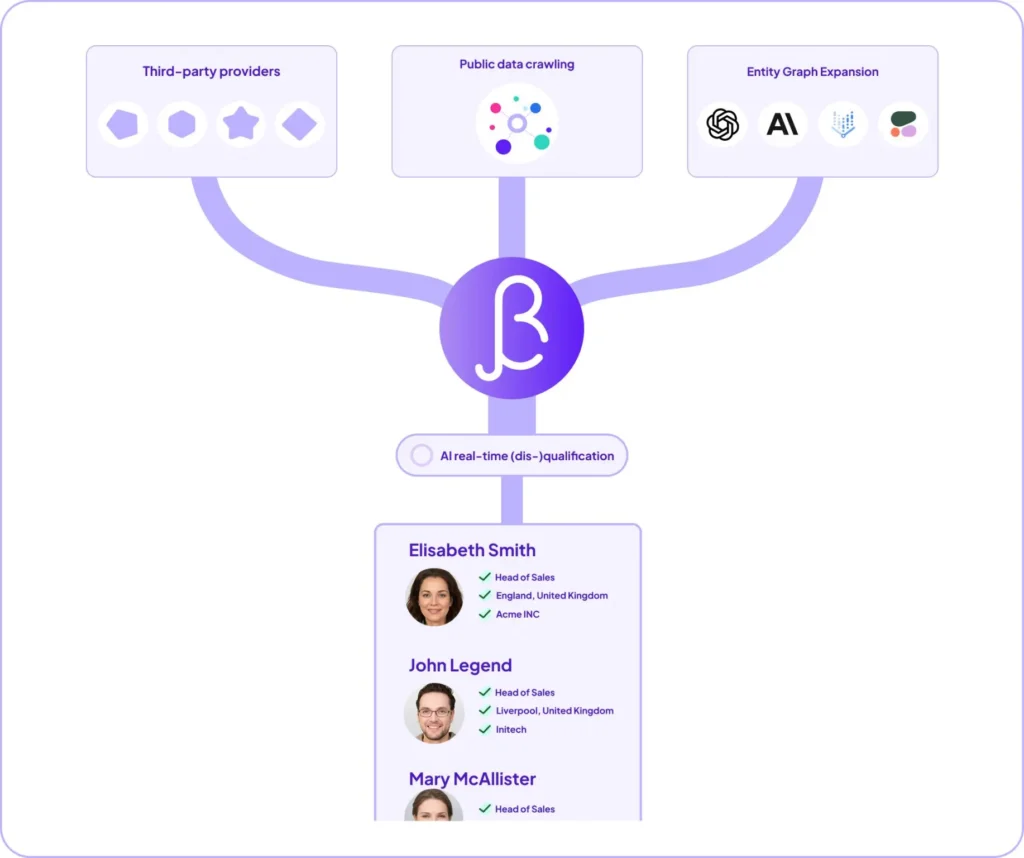
Its waterfall lead finder combines multiple B2B databases with AI-powered web crawling to extract data from LinkedIn profiles without the legal headaches associated with conventional scraping.
What sets BetterContact apart is its real-time verification system.
AI agents verify that people actually work at the companies they list and hold the job titles they claim.
This emphasis on data quality yields 5-10% more valid leads than legacy providers do, with 99.5% email verification accuracy.
You’ll access 3+ billion contact data points across 20+ sources, paying only when verified emails are found.
Top Features
- Waterfall Lead Finder: AI-powered waterfall lead finder combining multiple B2B databases and live web crawling to verify job, company, and location in real time, delivering up to 5–10% more valid leads than legacy providers.
- Waterfall Enrichment Providers: Access to over 20 top-tier data sources, ensuring comprehensive coverage and high email-finding rates.
- Coverage & Database Size: 3+ billion contact records, ensuring coverage across Europe, the USA, and Global Coverage.
- Accuracy: 99.5% email verification accuracy with the right person’s contact details.
- Multi-Layer Verification: SMTP & Catch-all verified emails with a >99.5% accuracy rate to maintain data quality.
- Mobile Phone Verification: The Inctricate feature includes GEO name matching & activity scoring to provide verified data.
- Web Visitor Identification: Native RB2B integration to find out website visitors’ email addresses.
- Pay Per Result: Users are charged only when a multi-layer-verified email or phone number is successfully found.
- BetterAI: Algorithm to find the best provider sequence based on lead characteristics.
- Inbox Details: The Email Provider Matching for users running Cold Email.
- Google Sheet App: Google Sheets app to find & manage both contact data, email addresses & mobile phone numbers.
- Integrations: Has integrations with Instantly, popular CRMs like Hubspot, Breakcold, and automation tools like Zapier, Make, and Clay.
- HubSpot AutoEnrich: Automatically enrich new or updated HubSpot contacts with verified email and phone numbers based on custom rules no manual work or complex automation needed.
Pricing
- Starter Plan: USD 15 monthly. 200 credits/month (200 valid emails or 20 mobile phone numbers). 1 email = 1 credit; 1 mobile phone = 10 credits.
- Pro Plan: USD 49 monthly. 1,000 credits/month (1,000 valid emails or 100 mobile phone numbers).
- Enterprise Plan: From USD 799 monthly. Custom credits/month with custom emails and mobile phone volumes.
2. Vayne
Vayne positions itself as the high-volume solution for teams that need to extract massive lead lists from LinkedIn Sales Navigator without triggering account bans.
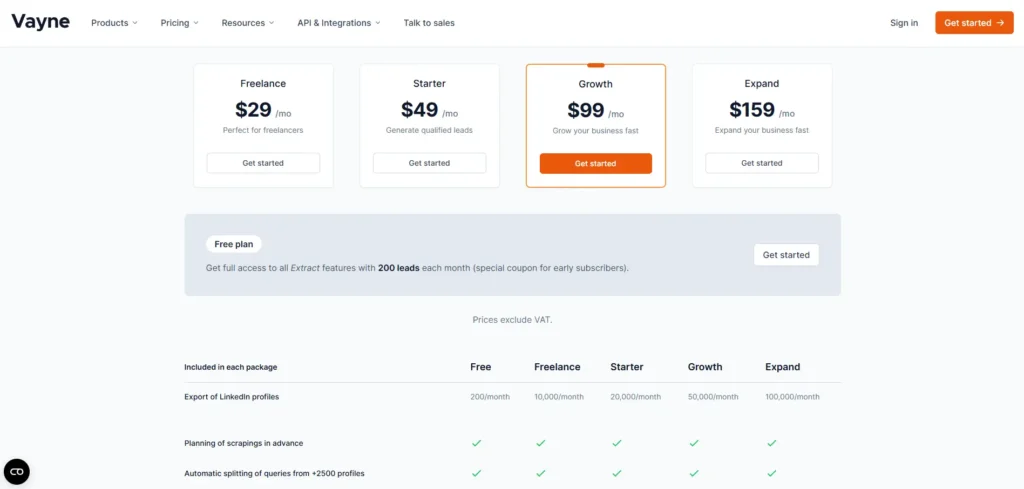
This scraper handles up to 15,000 LinkedIn profiles daily by splitting large queries into safe segments. You’ll get data cleaning that removes emojis and formatting issues, plus duplicate detection across extractions.
The professional email enrichment adds GDPR-compliant contacts to your exports.
The standout feature? High-volume lead extraction that blows past competitors’ 2,500-profile limits while maintaining account safety through intelligent automation.
Top Feature
- Sales Navigator Extractor: Exports any LinkedIn Sales Navigator search up to 15,000+ leads instantly.
- Automatic Query Splitting: Handles searches across 2,500+ profiles by automatically segmenting them, avoiding LinkedIn limits.
- Data Cleaning: Removes emojis, typos, and capitalization, and applies LinkedIn filters to produce ready-to-use files.
- Duplicate Detection: Identifies and eliminates previously scraped leads across extractions.
- Professional Email Enrichment: Adds GDPR-compliant emails using algorithms and verified databases.
Pricing
- Free Plan: 200 leads monthly with core extraction features (early subscriber coupon).
Basic Sales Navigator scraper, data cleaning; limited volume. - Freelance Plan: USD 29 monthly or USD 290 annually (USD 24.17/month).
10,000 leads/month, data cleaning, duplicate detection, and email support. - Starter Plan: USD 49 monthly or USD 490 annually (USD 40.83/month). 20,000 leads/month, all Freelance, plus API access and professional enrichment.
- Growth Plan: USD 99 monthly or USD 990 annually (USD 82.50/month). 50,000 leads/month, all Starter features for marketing teams.
- Expand Plan: USD 159 monthly or USD 1,590 annually (USD 132.50/month). 100,000 leads/month, full suite for high-scale teams.
3. Scrupp
Scrupp flips the subscription model on its head with a pay-per-lead credit system that charges you only for the contacts you actually export, no recurring fees, no expiring credits, no surprise invoices when you’re not running campaigns.
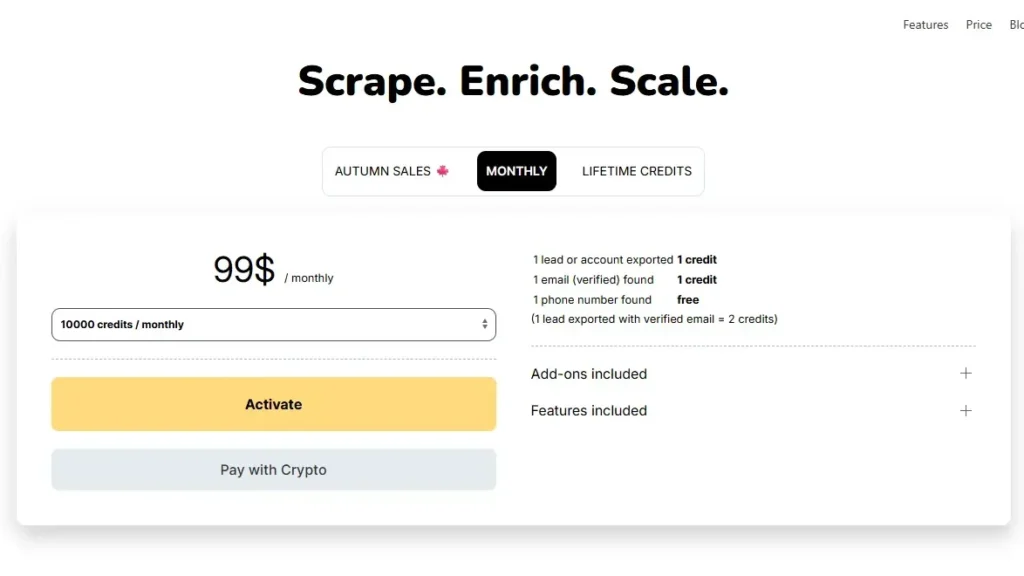
You’ll track scraping progress as it pulls up to 2,500 professional contacts from Sales Navigator, LinkedIn, and Apollo searches in a single pass. The platform handles lead exports from sources, automatically adds verified emails, and enriches records with phone numbers, all at no extra cost.
Data cleaning standardizes company fields and removes formatting headaches, transforming unstructured LinkedIn profiles into structured CRM-ready datasets.
For teams scaling outbound, API, and scheduling, it automates exports and syncs directly to your sales stack, making it ideal for variable-volume prospecting.
Top Features
- Lead Export from Sources: Extracts profiles from Sales Navigator and LinkedIn to 2,500 leads.
- Verified Email Discovery: Finds and validates business emails, attaches status without extra credits.
- Phone Number Enrichment: Adds verified phone numbers when available to improve outreach success rates.
- Data Cleaning: Standardizes company fields and removes formatting issues to ensure seamless CRM imports.
- API and Scheduling: Automates exports, syncs to CRMs, supports team workflows at scale.
Pricing
Scrupp uses a pay-per-exported-lead credit model with no subscriptions or expiring credits, starting low for batches: $39 for 2,000 monthly credits.
4. The Boomerang
When you’d rather hand off list building entirely than wrestle with scraping tools yourself, TheBoomerang positions itself as your outsourced research team pulling targeted B2B leads from Crunchbase, Glassdoor, G2, and half a dozen other sources. At the same time, you focus on actually closing deals.
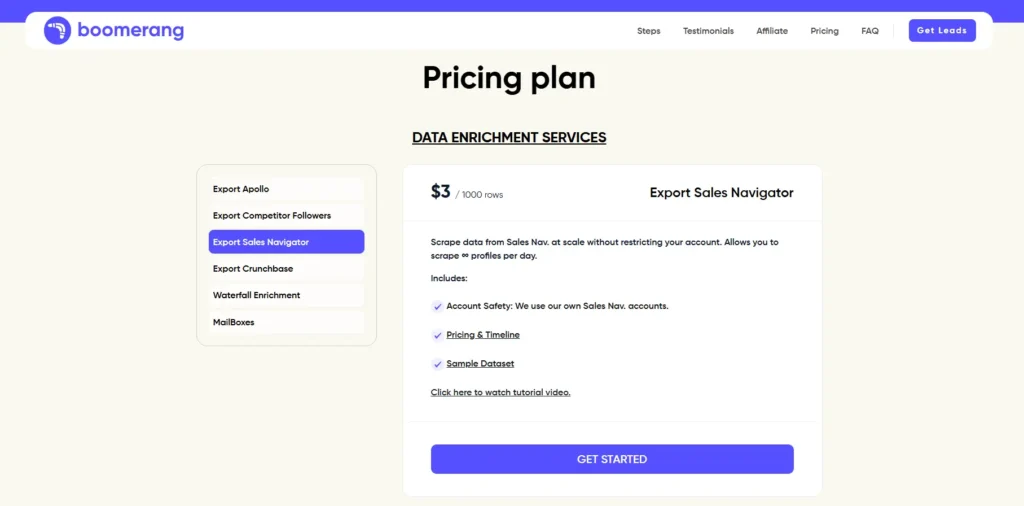
You submit a search URL or criteria, and their managed lead research crew scrapes matching company profiles, enriches them with firmographic intel, and emails you a structured CSV often within hours.
The email delivery workflow keeps things simple: no complex dashboards or self-serve dashboards to navigate. Data enrichment runs about $4 per 1,000 rows for Crunchbase fields, while custom prospect lists cost roughly $0.30-$ 0.60 per lead.
It’s a solid play for large-scale campaigns where SDR time costs more than outsourcing, though LinkedIn profiles and email verification may require external tools.
Top Features:
- Multi-Source Scraping: Extracts leads from 8+ platforms like LinkedIn, BuiltWith, Apollo, and Crunchbase.
- Instant Search Export: Paste a URL to scrape and quickly download cleaned lead lists.
- Data Enrichment: Adds email addresses, phone numbers, and company details to ready-to-use outreach files.
- CRM Compatibility: Supports direct inbox delivery and potential Ssyncs with Salesforce/sand HubSpot
- High-Accuracy Cleaning: Formats data and removes duplicates to enable efficient pipeline building.
Pricing
- Export Apollo: USD 3.50 monthly or USD 3.50 annually (USD 3.50/month)
Helps you export contact details from Apollo by submitting Apollo URLs, with pricing based on 1,000 rows per use and no daily scraping limits mentioned. - Export Competitor Followers: USD 3.50 monthly or USD 3.50 annually (USD 3.50/month)
Allows you to analyze and export competitor follower data to better understand target audiences and improve outreach, priced per 1,000 exported rows. - Export Sales Navigator: USD 3.00 monthly or USD 3.00 annually (USD 3.00/month)
Enables large-scale scraping from Sales Navigator without account restrictions, allowing unlimited profiles per day at a per-1,000-rows cost. - Export Crunchbase: USD 4.00 monthly or USD 4.00 annually (USD 4.00/month)
Provides fast access to company intelligence by exporting Crunchbase data, with simple usage-based pricing per 1,000 rows. - Waterfall Enrichment: USD 15.00 monthly or USD 15.00 annually (USD 15.00/month)
Finds verified email addresses using 8+ data sources, charging per 1,000 verified emails found, and focused on improving outreach accuracy.
5. Apify
Most LinkedIn scrapers lock you into a single interface or require you to code from scratch. Still, Apify flips the script by offering a cloud marketplace where dozens of pre-built LinkedIn actors essentially plug-and-play scrapers sit ready to run on managed infrastructure the moment you paste a search URL or profile list.
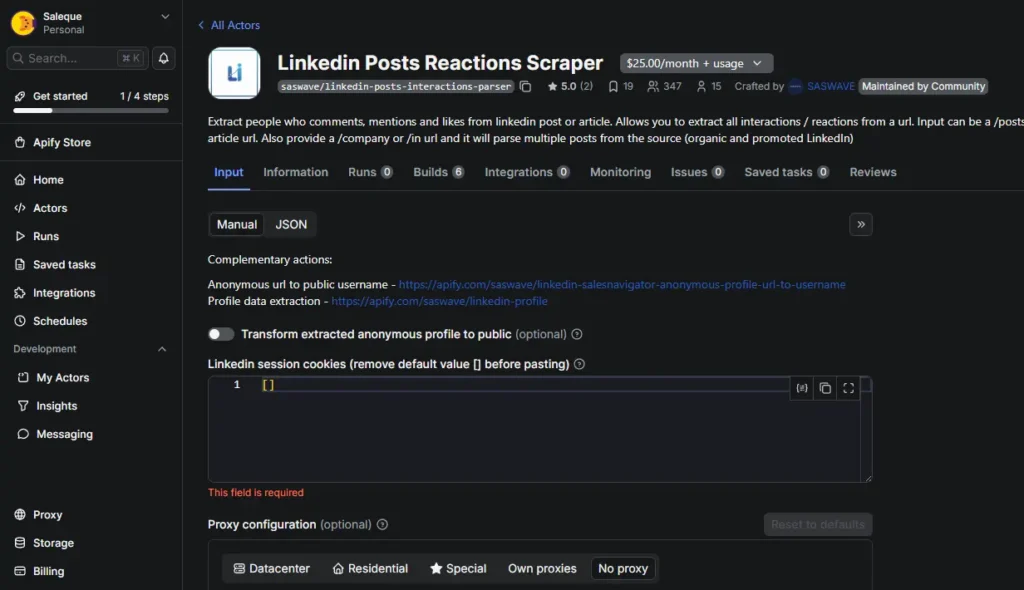
You’ll find actors for extracting LinkedIn profile data, scraping company pages, pulling job data, and harvesting posts, all without managing servers or worrying about HTML parsing complexities.
The platform handles web crawling at scale, letting you configure inputs, schedule runs, and pull results through multiple export formats: JSON, CSV, or Excel.
Pricing starts around $3 per 1,000 profiles, though proxy costs can climb with aggressive jobs.
It’s ideal when you need repeatable, high-volume extraction without building custom infrastructure.
Top Features
- LinkedIn Profile Scrapers: Extract names, titles, companies, locations, skills, and history from LinkedIn profiles or search result URLs at scale.
- Jobs & Post Scraping: Capture LinkedIn job listings or posts, including text, engagement metrics, authors, and filters such as keywords, dates, and locations.
- No-cookie: Several actors operate without user cookies, reducing the risk to personal LinkedIn accounts in compliant scraping use cases.
- Scalable Cloud Runs: Scrapers (actors) run on Apify’s managed infrastructure with scheduling, queues, and API access for automation workflows.
- Flexible Export Formats: Export LinkedIn data as JSON, CSV, or Excel, or consume it via the API to sync with CRMs, warehouses, or enrichment pipelines.
Pricing
- Free Plan: USD 0/month. $5 credits for testing LinkedIn scrapers; suitable for experimentation only.
- Starter Plan: $29/month with 0.3 per compute unit and enough credits for small-scale LinkedIn scraping and recurring runs.
- Scale Plan: $199 with 0.25 compute unit—higher credits and performance for serious B2B lead gen or recruiting workflows.
- Business Plan: $999/month with 0.2 compute unit. Built for high-volume teams, agencies, and LinkedIn-dependent products with enhanced support.
6. Bright Data
Bright Data takes a different approach by positioning itself as an enterprise-grade data infrastructure provider rather than a simple scraper.
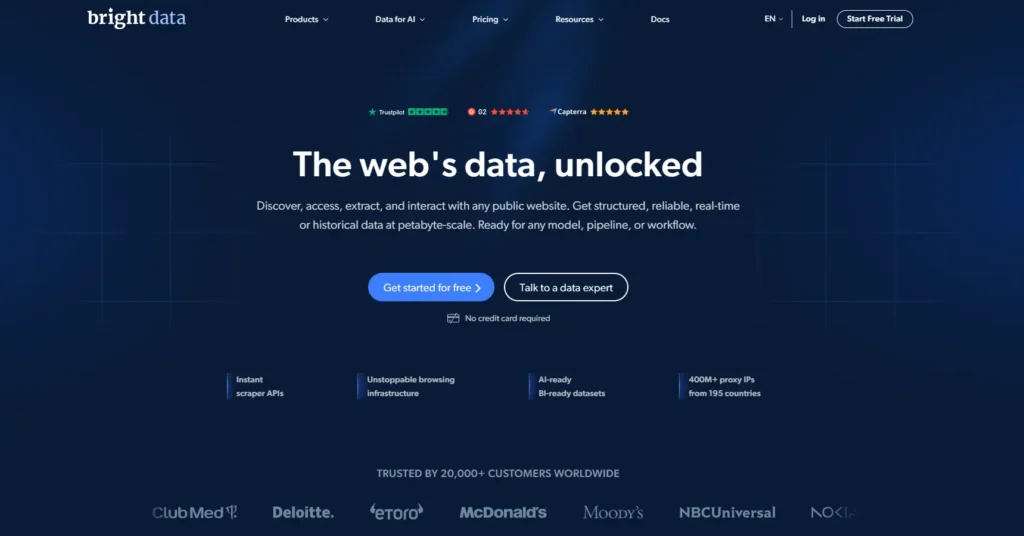
Offering dedicated LinkedIn APIs alongside a massive proxy network that powers Fortune 500 teams pulling millions of profiles monthly, you’ll get robust LinkedIn profile scraping capabilities, jobs and company data extraction, and sophisticated bulk request handling that tackles thousands of URLs simultaneously.
The proxy and unblocker stack effectively navigates anti-bot measures, while data validation and parsing deliver clean JSON/CSV outputs ready for your CRM.
However, pricing analysis reveals complexity, with expectations of around $1.05 per 1,000 requests or $0.05 per profile, but with steep minimum commitments.
User-reported issues often mention confusing pricing structures, occasional support delays, and a learning curve that can overwhelm non-technical teams, despite the platform’s impressive technical firepower.
Top Features:
- Proxies for LinkedIn: Large residential & mobile proxy IP pools with rotation and geo-targeting to emulate real users and bypass LinkedIn rate limits and blocks.
- Web Unlocker for LinkedIn: Managed unblocking layer that automatically handles CAPTCHA, redirects, and bot defenses on LinkedIn profile and search pages.
- LinkedIn-Targeted Scrapers: Ready-made scrapers and datasets for profiles, companies, and search results, delivered as structured JSON or CSV.
- Proxy Management: Fine-grained control over sessions, headers, and rotation policies to keep LinkedIn accounts safer and requests consistent.
- Compliance: Data governance, consent, and audit capabilities designed for enterprises operating LinkedIn scraping within legal and policy constraints.
Pricing:
Pay-as-you-go Residential proxies – LinkedIn scraping: $8/month or USD 100.80 annually (12 GB). No commitment; highest per-GB rate, suitable for testing LinkedIn profile or search scraping with minimal traffic before scaling.
Micro (Residential proxies – LinkedIn scraping): $10/monthly. The first $10 unlocks discounted residential rates of around USD 5.04/GB, enough for light LinkedIn lead list building and workflow validation.
7. PhantomBuster
PhantomBuster transforms LinkedIn into an automated prospecting engine through cloud-based “Phantoms” prebuilt scrapers that extract profiles, companies, job posts, and engagement data while you focus on closing deals.
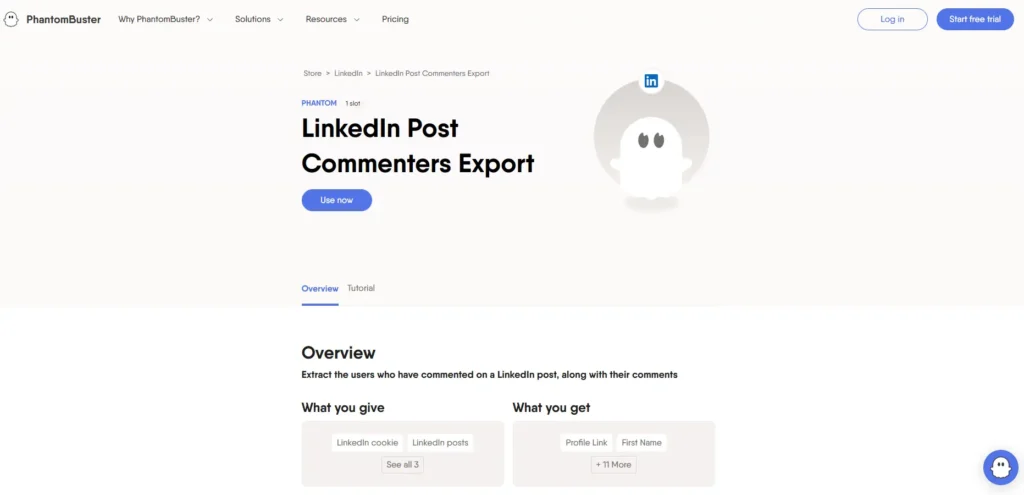
Unlike Selenium-based scrapers that require constant maintenance, PhantomBuster’s workflows automatically handle anti-scraping mechanisms, though LinkedIn UI changes occasionally break automations.
The LinkedIn profile scraper enriches your CRM with verified details, while the email finder bridges the gap between discovery and outreach campaigns.
LinkedIn search export chains directly into profile scraping, maintaining data freshness across multi-step sequences.
You’ll capture high-intent leads by scraping post-engagers, commenters, and likers to reveal buying signals that traditional searches miss.
Top Features:
- Lead & Data Extraction: Scrape profiles, company data, and contact details from LinkedIn, Google Maps, and multiple web sources at scale.
- Automated Outreach: Launch multi-step LinkedIn and email workflows with message personalization, delays, and follow-ups for social selling.
- Multi-Platform Automation: Automate actions on LinkedIn, X, Instagram, Google Maps, and directories for unified prospecting campaigns.
- AI Enrichment & Scoring: Use AI credits to enrich leads, generate copy, and prioritize prospects based on intent and engagement data.
- No-code Workflows: Use drag-and-drop flows and templates tailored to sales, marketing, and recruitment without engineering support.
Pricing:
- Starter: USD 69 monthly or USD 662 annually (USD 55/month)
Around 20 execution hours per day, a handful of Phantom slots, and baseline AI and email credits; suitable for solo users or very small teams. - Pro: USD 159 monthly or USD 1,526 annually (USD 127/month)
Higher execution hours (around 80 per day), more Phantom slots, and considerably more AI and email credits; designed for small to mid-sized teams running multiple workflows. - Team: USD 439 monthly or USD 4,210 annually (USD 351/month)
Large execution pool (around 300 hours per day), many Phantom slots, elevated email limits, priority support, and collaboration features suited for larger, automation-heavy sales teams.
📃Read This: How to Get Free Leads?
8. Scrapin
When you need LinkedIn data at API speed without managing proxies or worrying about scraper maintenance, ScrapIn positions itself as the infrastructure layer between raw HTML and your CRM.
You’ll get real-time access to public profiles and company data through clean JSON endpoints, complete with an API key for authentication.
The platform handles the messy bits, proxy rotation, anti-bot countermeasures, and compliance guardrails so your prospecting workflows stay focused on enrichment rather than scraping logistics.
Built for high-volume teams, it maintains sub-2-second response times and delivers structured data structures ready for CRM ingestion.
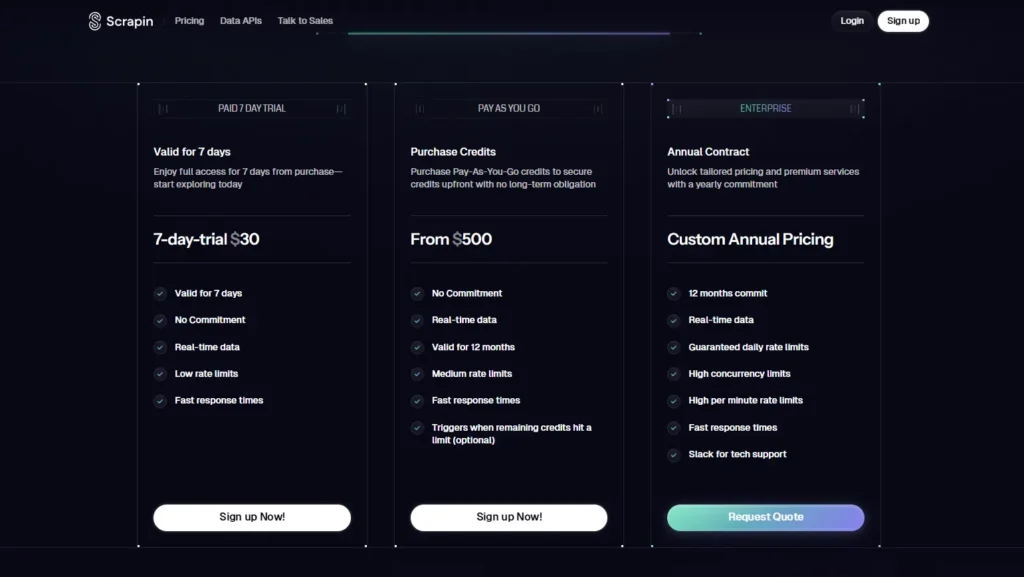
No true free trial; only pay-as-you-go, which may be a barrier for users wanting to experiment with zero upfront spend.
Pricing starts at $29/month for testing but scales quickly to $299+ for production use, reflecting LinkedIn’s inherent complexity and risk.
Top Features:
- Real-time B2B data API: On-demand JSON data for professional and company profiles, job listings, and signals, optimized for direct integration into products and workflows.
- Bulk Dataset Delivery: Licensed, continuously updated datasets delivered to S3, GCP, or Snowflake for analytics, enrichment, and model training at scale.
- No Official API Dependency: Access public profile and company data without needing platform logins or depending on fragile official APIs and rate limits.
- Compliance & Legal Framework: Scraping engine designed around GDPR and CCPA compliance, focusing on public data and transparent practices to reduce legal and reputational risk.
- Developer-Friendly Ecosystem: Clear documentation, easy-to-use APIs, sample snippets, and responsive support to speed up embedding into AI products.
Pricing
Pay-as-you-go: $500 credits must be purchased and are valid for just 12 months. Credit-based model aimed at startups and small teams, allowing low-volume real-time API calls to test enrichment, profile retrieval, and basic workflows without long-term contracts
9. Evaboot
While ScrapIn handles the infrastructure complexity behind the scenes, Evaboot takes a different approach, running directly in your browser as a Chrome extension.
Unlike playwright-based solutions that require technical setup, you’ll get one-click lead extraction straight from LinkedIn Sales Navigator’s job search pages.
The platform automatically cleans your exports by removing duplicates and standardizing company names, delivering clean data exports without manual cleanup.
What sets Evaboot apart is its built-in enrichment capability: it functions as both an email extractor and email verifier, appending validated professional addresses to your leads.
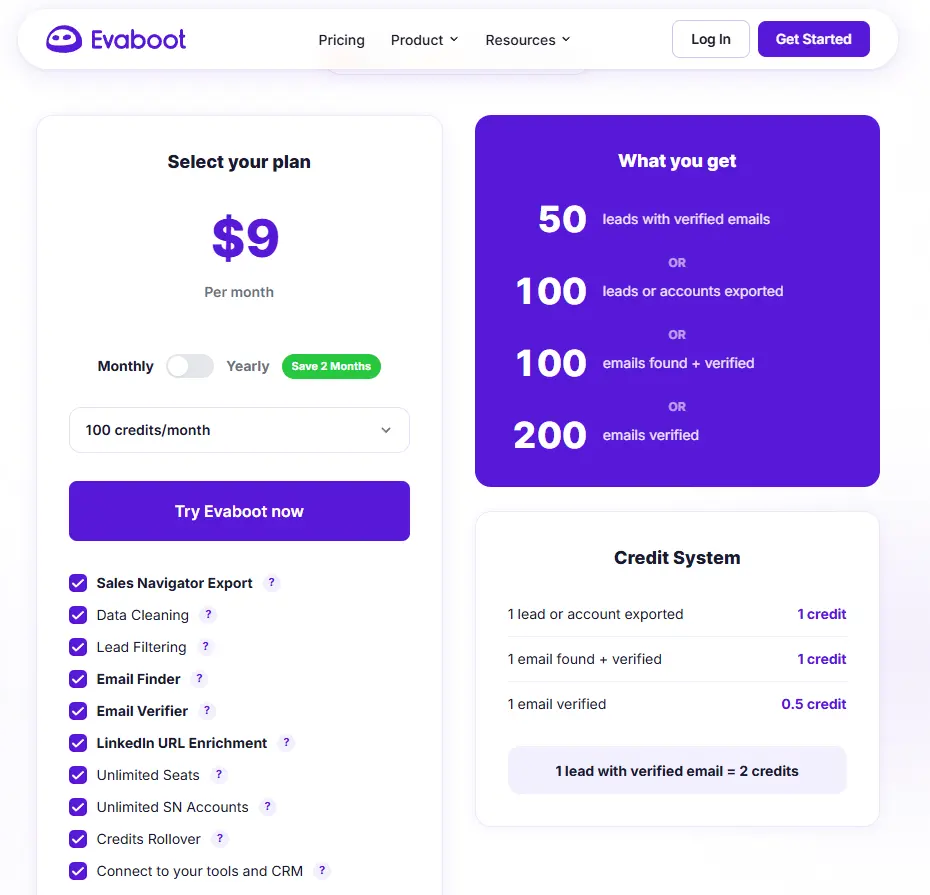
You’ll pay $9 per month for 50 verified emails, though you’ll need Sales Navigator access (minimum $99/month).
It’s purpose-built for sales teams who want browser-based simplicity over complex scraping infrastructure.
Top Features:
- LinkedIn Sales Navigator Scraper: Extracts targeted leads from Sales Navigator searches, saving time on manual data collection.
- Email Finder & Verifier: Automatically finds and verifies professional email addresses for exported leads, improving outreach deliverability.
- Data Cleaning & Deduplication: Removes duplicates and irrelevant contacts to ensure high-quality, actionable lead lists.
- CRM Export Integration: Exports cleaned lead data directly to popular CRMs or to CSV files, streamlining workflow integration.
- Bulk Processing: Processes thousands of leads simultaneously, supporting large-scale prospecting campaigns efficiently.
Pricing:
Evaboot costs $9 per month for 100 credits. The standard plan costs $49 per month or $490 per year and includes 1,500 monthly credits, core features, CSV export, and basic support. Evaboot does not include CRM integrations, and unused credits reset monthly.
7 Ways to Collect LinkedIn Data
LinkedIn offers you several strategic entry points for collecting data, each serving different business objectives.
You can extract information from LinkedIn Search Results for broad prospecting, mine LinkedIn Sales Navigator Lead Lists for targeted outreach, or gather names from Event Attendees and Post Engagers to identify active community members.
Company Followers represent another valuable data source, giving you direct access to people already interested in specific organizations.
1. LinkedIn Search Results
LinkedIn’s native search with Boolean operators can be exported to tools like Phantombuster, which extracts profile data to CSV/Excel. Free accounts are limited to 80-100 daily profiles. Ideal for beginners needing smaller datasets.
2. LinkedIn Sales Navigator Lead Lists
LinkedIn Sales Navigator with Evaboot’s Chrome extension enables one-click extraction of clean lead data names, titles, emails, and websites to target decision-makers, personalize outreach, and boost conversion rates efficiently.
3. Event Attendees
Virtual events enable targeted prospect list building on LinkedIn.
Tools like Phantombuster export attendee data to CSV files, enabling direct messaging without connection requests and automated follow-up campaigns that use event participation as icebreakers.
4. Post Engagers
LinkedIn post engagers are qualified leads who’ve shown interest by liking or commenting on the post. Export them via Phantombuster’s LinkedIn Post Likers Export Phantom (using json.loads), though free trials limit the number of sessions.
📃Read This: How to generate inbound leads?
5. Company Followers
Extract competitor followers using Phantombuster or TexAu by pasting LinkedIn URLs to get pre-qualified leads. Automate cross-page processes with Scrapfly’s asyncio capabilities for targeted engagement.
6. Group Members
LinkedIn groups provide pre-qualified leads sharing specific interests.
Export contacts via Recruiter/Sales Navigator using residential proxies to avoid detection. Clean the unstructured data, then analyze it for prospects who need solutions.
7. Mutual Contacts
Mutual connections on LinkedIn enable warmer outreach by revealing shared contacts with prospects. Quality scrapers can extract this data by paginating across connection layers, though LinkedIn’s terms of service restrict automated scraping.
To Wrap It All Up
You’ve now got a solid toolkit for scraping LinkedIn data in 2026. Whether you’re hunting for leads, enriching your database, or building prospect lists, these nine tools offer solutions for every budget and scale.
Remember to stay on the right side of LinkedIn’s terms of service and privacy laws; nobody wants legal headaches. Pick the tool that fits your needs, start small, and watch your data collection transform your outreach game.